Links open new windows
PSP Tut Home
Graphics Farm
Graphics Grotto
Apparel
Books
Ebooks
Ezines
Terms of Use
Privacy
Policy
Contact
me
AmeriYank's PSP Tutorials
helping you use graphics and graphics tools
Colored Weave
Texture Tutorial
Part 4
|
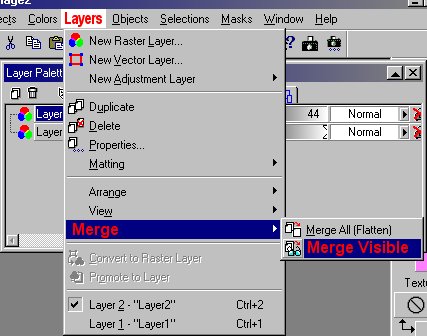
14 Now you need to merge the layers. |
|
|
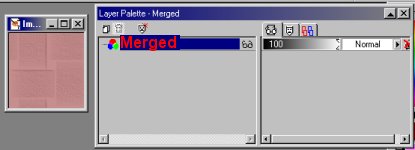
15 Your PSP screen will now look something like the image on the right . |
|
|
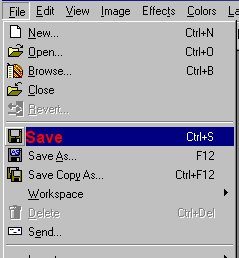
16 Now it is time to save your work. Go to "File" and "Save". Again, I added the red letters. |
|
|
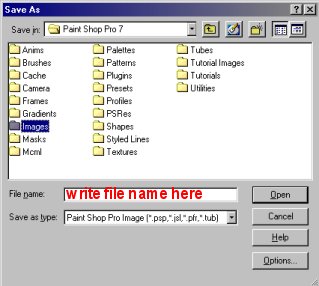
17 A new window will pop up for you. Browse your PC until you find a folder you would like to save your image in. It is your choice, but you will need to remember where you put it when you want to use it. |
|
|
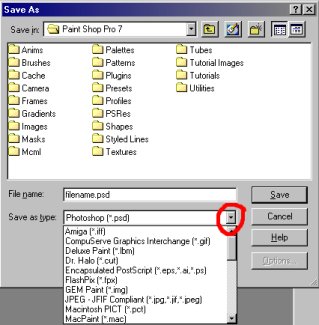
18 After you name the file, choose the file extension. This will choose the format your image will show in. I suggest you save it as a "psd" file. That will give you more options later. It is easy to convert a "psd" file to another file type without losing any resolution. What's resolution? Something for another tutorial. After you save it as a "psd" file, if you want to use the image as a background for a web page, you will need to resave it as a "jpg" pr "gif". I would only use a "jpg" for this image. It looks terrible as a "gif". Why? That's another lesson. To resave as another file extension, just go to "File", "Save As". The do the same thing you did when you saved it originally. |
|
|
This tutorial and all images are © MaryMorris/AmeriYank 2002. All rights reserved. My Terms of Use for tutorials are simple. You may link to the tutorial. You may email the tutorial wherever you wish, BUT keep all links intact. The tutorial has a ZIP file which includes all the instructions in HTML form, as they appear on the web. You may send the ZIP file to anyone you wish, but you must send it as it is. You may not alter it in any way. You may NOT post any of my tutorials on a web site and call it your own. I use WinZip to create the zip files. You will need an unzipping program of some kind to open it. With the exception of the image created in the actual tutorial, anything you create using what you learned is yours. You can sell it, distribute it, whatever you like. BUT, you may NOT use anything you create with any of my tutorials for "adult" material, anything harmful to children, anything illegal, nor anything hateful. Note that the image created in the tutorial is copyrighted by me and owned by me. It may not be sold or redistributed in any way. You CAN use it on your web site, for t-shirts, and any other use EXCEPT selling or distributing it in digital form in any way. And, of course, you may NOT use it for "adult" material, anything harmful to children, anything illegal, nor anything hateful. |